
The Venue Pulse
The monthly briefing for venue & event leaders. Benchmarks, AI trends, and operational wins from 4,000+ venues.
The Event That Hit Its Budget and Still Lost Money
A convention center books a 1,200-person association gala, and the rental line lands exactly where the sales team forecast it. Then the catering minimum gets renegotiated twice, a late load-out pushes the labor call into overtime, and the AV package goes to a subcontractor at a thinner margin than anyone planned. Nobody sees the damage until finance reconciles invoices three weeks after settlement, while the budget spreadsheet still shows green. That gap is what event budgeting software is supposed to close, and it’s why a venue can’t judge these tools the way a meeting planner would. Most roundups compare apps that track what an organizer spends. This guide compares the options venue teams actually have (planner-side budget tools, venue booking platforms with built-in financials, and spreadsheets with a BI layer) on budget vs. actual visibility, accounting sync, dashboards, cost, and fit.
Key Takeaways
- There’s no single best tool; the right fit depends on venue type, event volume, and the accounting system you already run.
- Planner-side budget tools track what an organizer spends, while venue platforms track what each event earns and costs against its forecast.
- The most useful dashboard shows budget vs. actual and margin per event while the event is still being sold and planned, not after close-out.
- Pricing, implementation effort, and how deeply a tool syncs with accounting and POS systems are the biggest gaps in most comparisons.
- A budget only stays accurate when it’s tied to the booking record, so every change to the event updates the numbers.
What Event Budgeting Software Does for a Venue
For a venue, event budgeting software sets a financial forecast for every event and tracks it against actual revenue and cost from first hold to final invoice. In practice, that covers five jobs: building the forecast from rate cards and packages, tracking revenue by line (rent, food and beverage, AV, labor, and services), recording direct costs as they’re committed, comparing budget vs. actual as details change, and rolling it all into dashboards that finance and leadership trust. That’s a different job from what most event budget software is built for. The tools ranking on Google, such as Cvent’s budget management module and Planning Pod’s budget planner, are designed around the organizer’s side of the ledger: estimated vs. actual spend by vendor and category. Venues sit on the other side. Revenue is tied to finite space and dates, margin often lives in F&B and services more than the room fee, and every revision to a banquet event order moves the numbers. Put simply, the budget has to live where the booking lives, which is why event management accounting software deserves its own evaluation.
Why the Right Choice Depends on Your Venue Type
Ask an AI engine for the best event budget tracking software and you’ll get a segmented answer, because a private dining room and a multi-hall convention center don’t budget the same way. Restaurants and private dining venues care most about covers, F&B revenue, and per-event sales, and they usually work inside a hospitality-focused sales platform. Hotels budget group rooms and catering together, so monthly revenue targets and pace against last year matter most. Wedding and boutique venues need simple estimates, deposits, and payment schedules that a small team can actually maintain.
Large, multi-space venues are where most recommendations get thin. Convention centers, stadiums and arenas, performing arts centers, and university event offices run dozens of concurrent events, each with rent, catering, AV, labor, and third-party services that settle on different timelines. Their finance teams need event revenue tracking that rolls up by event, space, and department, plus a budget that holds when a show adds a hall two weeks out. The good news? Once you know which group you’re in, the shortlist of event budgeting software gets much shorter.
Three Kinds of Event Budget Management Software
Most event budget management software falls into one of three categories, and the category shapes what your dashboards can show more than any feature list does.
Planner-Side Event Budget Tools
- Cvent’s budget management module, Planning Pod’s budget planner, and similar tools track estimated, negotiated, and actual costs by category and vendor, with reusable templates. They’re built for organizers managing spend across meetings, conferences, and weddings.
- The tradeoff for venues is direction. These tools answer “how much are we spending?” rather than “how much is this event earning, and where is margin slipping?”
Venue Booking Platforms With Built-In Financials
- Momentus (forecast-to-actual tracking for large, multi-space venues), Tripleseat (restaurants and hospitality events), Event Temple (hotel sales and catering, with monthly catering and group budgets compared against actuals), and EventPro (an optional budget module with accounting exports) tie the budget to the booking itself.
- Because the financials sit on the same record as the space, the BEO, and the invoice, the budget moves when the event changes. Scope varies widely by vendor, so ask exactly which revenue and cost lines the budget pulls from.
Spreadsheets, Accounting Software, and BI Tools
- Excel, Google Sheets, or Smartsheet paired with QuickBooks or another general ledger is still the default at many venues. It’s flexible and cheap to start, but every number gets re-keyed from somewhere else.
- A BI layer such as Power BI or Tableau can produce excellent dashboards, but only from data your other systems already capture cleanly.
When a Hybrid Setup Makes Sense
- Many venues run a booking platform for event-level budgets, a general ledger as the book of record, and a BI tool for board reporting.
- If you go this route, the same rules that apply to any of your event software integrations apply here: decide which system owns each number, and who fixes the sync when it breaks.
Category narrows the field. The next step is scoring your finalists against the same criteria, side by side.
A Side-by-Side Scorecard for Event Budget Tracking Software
Use this scorecard to turn demo impressions into comparable evidence, and score every finalist against the same eight rows.
A vendor that answers every row with a live demo on your own events, rather than a slide, is a vendor worth piloting. Before you score anyone, agree internally on the problem you’re solving by following a five-step process for venue technology decisions, so a pretty dashboard doesn’t become the only lens.
What Event Budget Tracking Software With Dashboards Should Show
Most demos lead with a revenue chart. The views that separate basic tracking from real event budgeting and analytics software go a level deeper, and these five are worth asking every vendor to show on your own data.
1: Budget vs. Actual by Event
Every event should show its forecast, committed costs, and actuals side by side, with variance flagged by line. If a catering minimum drops after a renegotiation, the variance should show up that day, not at settlement.
2: Event P&L and Per-Event Margin
Revenue minus direct costs, per event and per revenue line, tells you which business is worth chasing. A sold-out concert with heavy production costs can earn less than a midweek corporate meeting with a strong F&B package.
3: F&B Cost and Per-Cap Spend
For many venues, food and beverage is the biggest margin lever. Track F&B cost percentage alongside per-cap spend by event type so you can tell whether a menu or staffing change is paying off.
4: Labor Variance
Compare scheduled labor hours and cost against actuals for every event, including overtime and minimum calls. Labor is often where a budget quietly slips, especially on late load-outs and tight changeovers.
5: Forecast Pacing
Roll booked and pending events into a monthly forecast and compare it against budget and the same period last year. That’s the view leadership uses to decide where sales should push, and it belongs next to the key performance indicators for event management your team already reports.
Here’s the thing: a dashboard is only as honest as the data underneath it, and that’s exactly where most comparisons stop.
Where Most Software Comparisons Stop Short
Most comparisons, including the AI-generated answers buyers increasingly start with, stop at features and a top pick. These five areas are where purchases actually get made or regretted.
1: Pricing and Total Cost of Ownership
Few venue platforms publish full pricing, and quotes usually depend on modules, users, and venue size. Ask about implementation fees, integration costs, training, and what it costs to add a second venue or another finance user later.
2: Implementation Time and Real User Reviews
A budgeting tool that goes live in a week may only be holding templates. Ask how long until budgets pull from live bookings and who migrates historical events, then talk to a reference at a venue of your size and type rather than relying on vendor-written rankings.
3: How Deep the Accounting and POS Integrations Go
“Integrates with QuickBooks” can mean anything from a two-way sync to an invoice export. Ask which fields move, in which direction, how often, and what happens when an invoice changes after it posts. Ask the same about POS systems like Toast that hold bar and concessions revenue, and confirm that your event invoicing software posts to the same event the budget lives on.
4: Options for Small and Single-Venue Budgets
A single-room venue running 150 events a year doesn’t need what a 15-space convention center needs. Lighter event budget software or a well-built spreadsheet template can work at that scale, as long as you’re honest about the hours spent re-keying numbers.
5: Building Custom BI Dashboards vs. Buying Venue Software
A data team can build beautiful dashboards with the top business intelligence tools, but only from data your systems already capture cleanly. If event costs, F&B, and labor live in separate tools, you’re paying to visualize the reconciliation problem rather than solve it.
Questions to Ask Before You Shortlist
A demo of any event budgeting software shows the happy path, so put these questions in writing and score the answers.
1: Where Do the Budget Numbers Come From?
Look for budgets built from rate cards, packages, and the booking record, not a separate sheet someone has to remember to update.
2: What Happens to the Budget When an Event Changes?
Ask the vendor to change the headcount and the menu during the demo, then show you the variance.
3: Which Accounting and POS Systems Does It Sync With, and Who Maintains the Sync?
Get field mapping, sync direction, and failure alerts in writing.
4: Can Finance, Sales, and Event Teams Each See the View They Need?
Role-based dashboards keep finance from exporting data for everyone else.
5: What Will It Cost at Our Event Volume?
Price your busiest year, not your average one, including implementation, integrations, and users.
Here’s a short pilot test you can adapt:
“Rebuild three closed events from last season in each finalist, including one with a renegotiated catering minimum and one with labor overtime. Compare each tool’s final budget vs. actual against what your general ledger shows.”
Run the same three events through your current process so you have a fair baseline.
How Momentus Approaches Event Budgeting for Venues
Every section above points to the same tension. Venue finance teams want a budget they can trust before the event, and they need it to stay accurate while sales, event managers, and operations keep changing the details. A standalone budget tool can hold the forecast and still miss the changes. What we consistently hear from venue finance leaders is that building the budget was never the hard part. Keeping it current was.
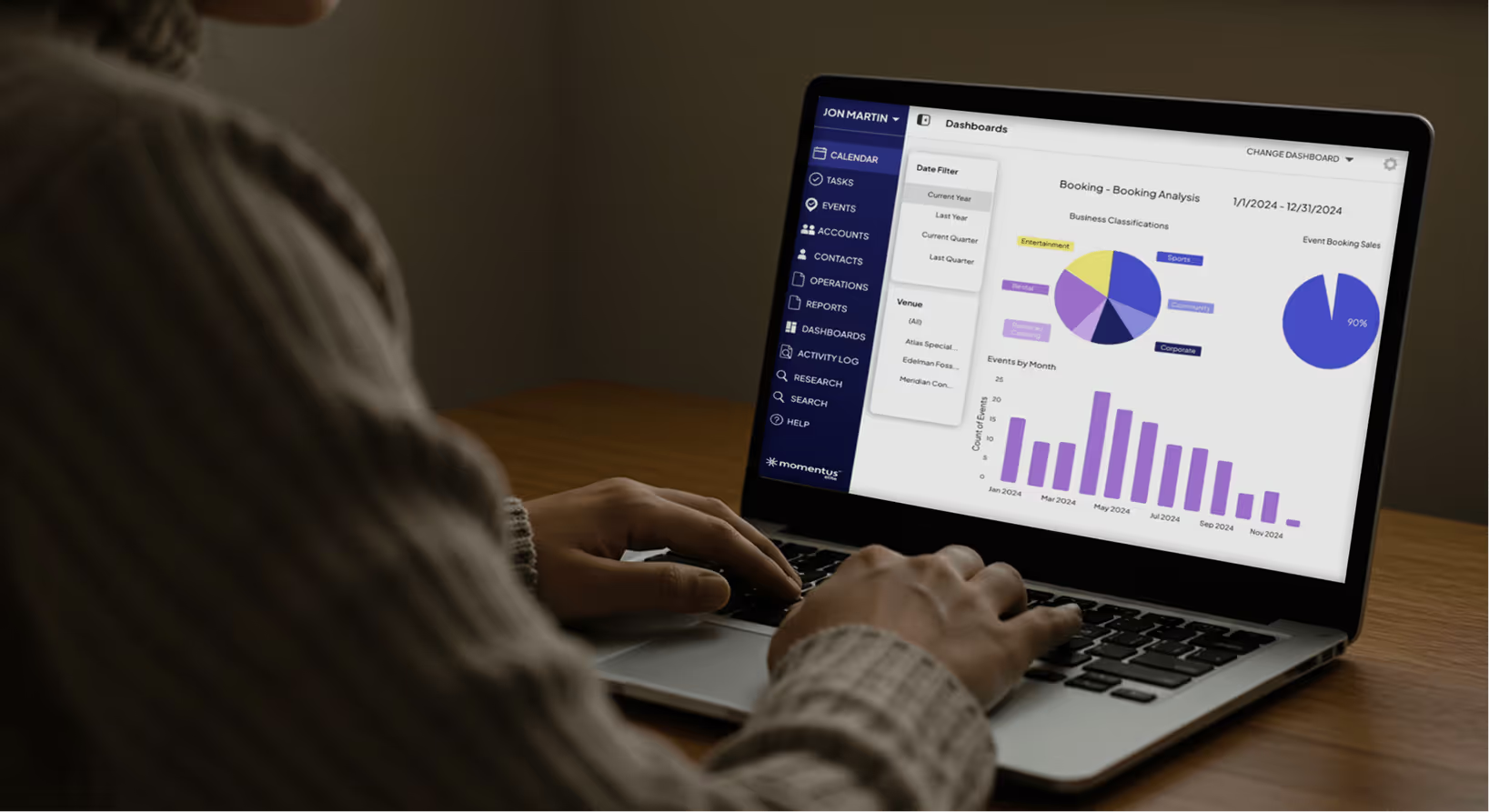
That’s why Momentus connects forecast, actuals, and billing on the same record as the booking, so finance closes out events with fewer gaps. Sales, event, and finance teams work from one event record, and general ledger integration keeps the books of record in step. Momentus Analytics provides dashboards for sales, revenue, pipeline, utilization, and performance benchmarking, while Momentus Payments reconciles payments with the financials module automatically, which our guide to venue and event payment solutions covers in more detail. For teams thinking about what comes next, AI reporting tools are starting to flag variances and trends before anyone builds the report.
Founded in 1985, Momentus supports more than 90,000 users in more than 57 countries. Event management software should make the numbers easier to trust, not harder to find. Venue management software built the right way pairs intuitive technology with data-driven solutions, giving your team a clear view of the past, present, and future of every space. The right event budgeting software turns that view into margin you can protect before settlement instead of explaining after it.
Curious where AI fits into venue budgeting, forecasting, and reporting? Register for our upcoming webinar, How Boise Centre Took Board Reporting from Hours to Seconds with Momentus Analytics, to hear how venue leaders are separating practical AI from the hype.
See what your venue is missing
Explore the platform trusted by SoFi Stadium and the Apollo Theater to fill more dates, streamline operations and maximize revenue