
The Venue Pulse
The monthly briefing for venue & event leaders. Benchmarks, AI trends, and operational wins from 4,000+ venues.
The Friday-Night Inquiry Nobody Answered Correctly
At 9:40 on a Friday night, a corporate planner sends the same 400-person RFP to five venues. One replies within minutes, cheerfully confirming that the ballroom is open, even though a second hold has sat on that date since Tuesday. Another sends a correct, complete proposal on Monday morning, and by then the planner has already booked a site visit somewhere else. Choosing the best AI sales assistant for a venue sales team comes down to closing both gaps at once: answering fast and answering right. Most comparisons rank tools on speed and features alone. This guide compares the options venue teams actually have (standalone AI agents, AI built into a venue CRM, and generic assistants) on accuracy, integration depth, cost, risk, and the metrics that prove one is working.
Key Takeaways
- There’s no single winner; the right tool depends on venue type, inquiry volume, and the CRM you already run.
- Standalone AI agents answer fast across more channels, while AI built into a venue platform can check live availability, pricing, and client history.
- A confident reply that quotes the wrong date or rate costs more than a slow one, so accuracy belongs at the top of any evaluation.
- Pricing, implementation effort, and independent proof of results are the biggest gaps in most comparisons.
- Judge success on win rate, deal size, and rep admin time after go-live, not on response speed alone.
What an AI Sales Assistant Actually Does for a Venue
For a venue, an AI sales assistant handles the repetitive work between an inquiry landing and a rep picking up the phone. That usually means five jobs: capturing inquiries from web forms, email, and third-party channels; replying within minutes; qualifying the lead on date, headcount, and budget; following up when a planner goes quiet; and booking site visits or building a first proposal. That’s a different job from the sales AI most software roundups cover. Those lists are built around outbound B2B selling, with call coaching, prospect research, and email sequences. Venue sales runs the other way. Demand is mostly inbound, every quote is tied to a finite calendar of spaces and dates, and the real money often lives in catering, AV, and services rather than the room fee. Put simply, a sales AI assistant built for a software company doesn’t know what a second hold is, which is why venue sales automation tools deserve their own evaluation.
Why the Right Choice Depends on Your Venue Type
Ask any AI engine to name the top tool for venue sales and you’ll get a segmented answer, because a wedding barn and a 700,000-square-foot convention center don’t sell the same way. Wedding and boutique venues field a high volume of couples asking about price and availability, often by text or Instagram, and a fast, friendly reply that books a tour is most of the battle. Restaurants and private dining rooms sell smaller events quickly, usually inside a hospitality-focused CRM. Hotels work group RFPs that often arrive through sourcing marketplaces, so speed and completeness on the RFP response matter most.
Large, multi-space venues are where most recommendations get thin. Convention centers, stadiums and arenas, performing arts centers, conference centers, and universities juggle dozens of spaces, stacked holds, setup and teardown windows, and contracts where catering and AV can outweigh rent. A team answering an event RFP at that scale has to check more than whether a date is open. It has to know whether the date is worth more to a competing hold. The good news? Once you know which group you’re in, the shortlist gets much shorter.
Standalone AI Agents vs. AI Built Into Your Sales Platform
Most AI sales assistant tools fall into one of three architectures, and the architecture shapes accuracy more than any feature list does.
Standalone AI Sales Agents
- Standalone sales tools sit alongside your CRM, handling fast communication for basic venues.
- The tradeoff is context. A standalone agent only knows the availability, pricing, and policies you sync to it, so stale data turns into confident wrong answers.
AI Built Into a Venue CRM or Booking Platform
- Momentus offers AI CRM capabilities via MAX for Sales for seamless, data-driven venue management.
- Because the AI reads the live calendar, rate cards, and client history, it can qualify and quote with real data. Scope varies widely by vendor, though, so ask exactly which workflows the AI touches.
Generic AI Assistants
- ChatGPT, Copilot, and similar tools are good at polishing a reply or summarizing a long RFP. They don’t know your calendar, booking rules, or pricing, so every answer needs a human to check it and paste it in.
- Watch what reps paste into them, too. Client contracts and pricing shouldn’t land in a consumer tool your security team hasn’t approved.
When to Use Both
- Many venues combine front-door capture tools with an integrated CRM system for end-to-end efficiency.
- If you go this route, the same rules that apply to any of your AI integrations with event tools apply here: decide which system owns the lead record, and who fixes the sync when it breaks.
Architecture narrows the field. The next step is scoring your finalists against the same criteria, side by side.
A Side-by-Side Scorecard for AI Sales Assistant Software
Use this scorecard to turn demo impressions into comparable evidence, and score every finalist against the same eight rows.
A vendor that answers every row with a live demo on your own data, rather than a slide, is a vendor worth piloting. Before you score anyone, agree internally on the problem you’re solving, following a five-step process for venue technology decisions, so speed doesn’t become the only lens.
Where Most Vendor Comparisons Stop Short
Most comparisons, including the AI-generated answers buyers increasingly start with, stop at features and a top pick. These six areas are where purchases actually get made or regretted.
1: Pricing and Total Cost of Ownership
Few vendors publish full pricing. Standalone tools often sell monthly plans tied to lead or conversation volume, while platform vendors usually quote by package. Ask about setup fees, integration costs, per-channel charges for phone or SMS, and what happens to the bill in your busiest season.
2: Independent Proof of Results
Many “best of” lists in this category are written by vendors or their partners, and AI engines repeat them. Ask for a reference at a venue of your size and type, along with before-and-after numbers on response time and conversion that the customer will confirm on a call.
3: Implementation Effort and Integration Depth
A tool that goes live in a week may only be answering FAQs. Ask how long it takes before the AI can quote from your live calendar, who builds the connection, and what your team needs to clean up first. Good event software integrations have a named owner on both sides.
4: Wrong Prices, Phantom Availability, and Brand Voice
The costliest AI error isn’t a slow reply. It’s a confident one that promises a date already on hold or a rate below your minimum, leaving a rep to walk it back with a client who’s already annoyed. Ask how the tool checks against your event calendar management rules, what it says when it doesn’t know, and whether you can set its tone and the topics it won’t touch, such as contract terms.
5: Voice and Phone vs. Email and Text
Plenty of event inquiries still start with a phone call, and voice AI is a different product from an email assistant. If phone matters to you, test it with real calls, including background noise and a caller who changes the date halfway through.
6: Fit by Team Size
A two-person wedding venue team needs an assistant that books tours on its own. A 10-person convention center sales team needs one that routes, scores, and supports reps who already own accounts. Ask each vendor who its typical customer is, and believe the answer.
Questions to Ask Before You Shortlist
A demo shows the happy path, so put these questions in writing and score the answers.
1: Where Does the AI Get Availability and Pricing?
Look for live reads from your calendar and rate cards, not a separate list someone has to remember to update.
2: What Can It Send Without a Human Approving It?
You should be able to decide, by message type, what goes out automatically and what waits for a rep.
3: Which Channels Does It Cover, Including Phone?
Match the answer to where your inquiries actually come from, not where the vendor is strongest.
4: How Does It Connect to Our CRM, and Who Maintains That Connection?
Get the integration owner, sync direction, and failure alerts in writing.
5: Is Our Data Used to Train Your Models?
The answer should be no, backed by a written policy and a log of every AI action.
6: What Will It Cost at Our Inquiry Volume?
Price your peak month, not your average one, including setup and per-channel fees.
Here’s a short pilot test you can adapt:
“Send five real inquiries from last season through each finalist, including one for a date with a competing hold and one with a nonstandard catering request. Score every reply on accuracy, speed, and tone before anyone edits it.”
Run the same five through your current process so you have a fair baseline.
Measuring Success After Go-Live
Speed is the easiest number to improve and the least useful one to report on its own. Before launch, baseline median first-response time, inquiry-to-site-visit rate, inquiry-to-contract rate, proposal turnaround, average contract value including catering and AV, and the hours reps spend on admin each week. Review a sample of AI replies every week for the first month and log every correction. After 90 days, compare win rate and deal size against the same season last year. Tie those results to the key performance indicators for event management your leadership already tracks, so the tool earns its renewal on revenue rather than activity counts.
How Momentus Approaches AI for Venue Sales
Every section above points to the same tension. Venue sales teams want replies in minutes, and they need every reply to reflect the real calendar, real pricing, and the real history with that client. A standalone agent can win the first half and miss the second. What we consistently hear from venue sales leaders is that speed was never the whole problem. Reps lose most of their week to triage, availability checks, and rebuilding proposals from scratch.
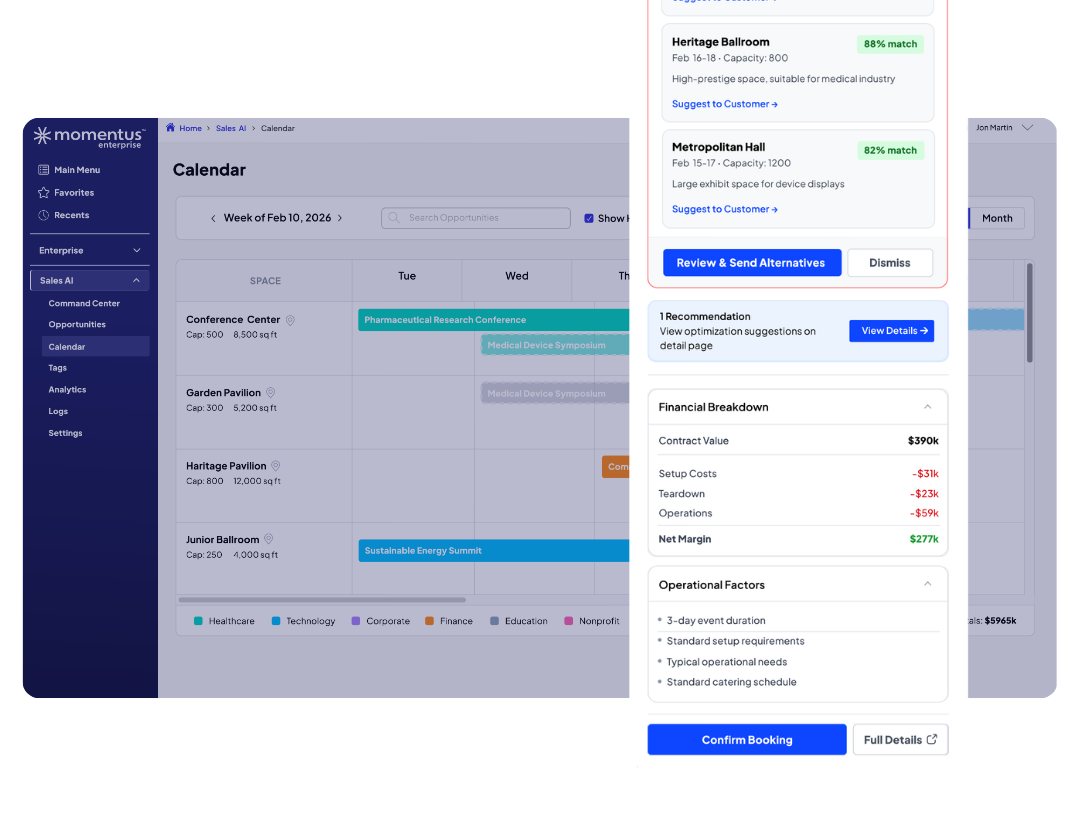
That’s the thinking behind MAX for Sales, the first product in MomentusMAX, which became generally available to Momentus Enterprise and Elite customers in September 2026. It runs inside Momentus rather than beside it. The Lead Engine captures inquiries from web forms, email, and attachments, recognizes returning clients, and scores leads with configurable rules that explain each score. The Calendar Engine flags competing holds and setup conflicts across every space and compares them by projected revenue. The Revenue Engine builds proposals with catering, AV, and add-ons drawn from comparable past bookings, with margin updating live. Every recommendation waits for a rep’s review before it reaches a client, and customer data isn’t used to train public models. Convention center sales teams can see how it fits their workflow, and the Momentus Trust Center holds security documentation.
Founded in 1985, Momentus supports more than 90,000 users in more than 57 countries. Event management software should make every rep faster without making anyone guess. Venue management software built the right way pairs intuitive technology with data-driven solutions, giving your team a clear view of the past, present, and future of every space, so the first reply a planner gets is also the right one.
See what your venue is missing
Explore the platform trusted by SoFi Stadium and the Apollo Theater to fill more dates, streamline operations and maximize revenue